
This is the culmination of many hours of work:
Be amazed: the points change every time you load the page.
I’m hoping the pace picks up now that I’ve gotten the hang of it…
This is the culmination of many hours of work:
Be amazed: the points change every time you load the page.
I’m hoping the pace picks up now that I’ve gotten the hang of it…
I first got into programming in about 1998 when a friend of mine showed me an AOL prog, an add-on for the then-popular America Online software that enabled you to do cool, geeky things like kick people offline, steal passwords, etc. Most of the progs, I found out, were written using Microsoft Visual Basic, a program that lets you create new software. I downloaded a free copy of Visual Basic 5.0 CCE edition (free) and was on my way.
In order to make an add-on for the America Online software (or any other software for tha matter), you had to take advantage of the Windows API, which is basically a set of tools Microsoft provides developers so that they can interact with the Windows environment.
A BAS file is a collection of code grouped together for a specfic purpose. For AOL progs, a typical BAS file enabled you interact with the America Online software using the Windows API. Add-on programmers would write these BAS files and exchange them with each other to save time and so they could share their work with others.
As I learned more and more about interacting with AOL while writing Revolution and later Meridian, I started writing my own BAS file. Over several months it grew into a fairly robust collection of functions and procedures for building add-ons. Encouraged by the glory other developers were seeing after releasing their BAS files, I decided to release mine, which I called Alpha32.bas. In my ever-optimistic mind, it was going to blow away everything else that had been created up to that point.
I enthusiastically wrote up some documentation, released it, and… nothing happened (this has been a recurring trend for me). Actually, I got a few compliments from developers, but it never gained much traction. Another developer released a BAS file called dos32.bas at about the same time which, I admit, blew mine out of the water.
For the curious, you can download Alpha32.bas by clicking here. The code is pretty bad, but hey, it was a start.
Here’s a peak:
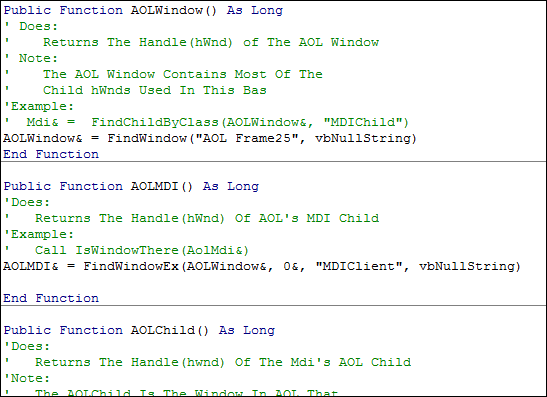
And here’s the documentation. It seems the I never finished it — not sure what happened there…
~IsWindowThere
This is used mostly for errors. For example if you have just made a code to click an icon in the chat room, and your testing it and it doesnt work? Whats wrong? Well the first thing most people would do is to check if you found the right icon. You Would Put Your Code. Then Put Call IsWindowThere(AoIcon&). If It Finds The icon the n there is a problem with your ClickIcon sub, If it doesnt find the icon, there is a problem with your coding and now you know that you have to fix it.~AOLWindow&
Returns The hwnd of The America Online Client Window. The AOLWindow Contains all other windows in AOL except an _AOL_Modal and an _AOL_Splash. If You hide the AOLWindow You Hide All Other Childs In AOL.~AolMdi
The AOL Mdi’s class name is “MDIClient”. The MDI Client Is The Parent Of All The AOL Childs. If you hide the MDIClient then all childs will we gone and all you will see on the AOL screen is a white rectangular area.~AOLChild
The AOLChild Is Every window in AOL that has a caption and looks like a VB form. Every AOL Child has a caption which you can change with the change title sub. One example Of An AOL Child is the Welcome Screen; it has a title of “Welcome, …” and has childs that you can click.~AOLModal
A Separeate Window From AOL that was probably made disable the user from using AOL until they have read or seen the AOL Modal. In short the AOL Modal Is a Bannar that says “You must acknowledge the information withing this window before you continue running AOL”. Some examples of AOL Modals are any set prefrences windows (Which you can acces via My AOL | Prefrences), the box that pops up saying “Your mail has been sent”, after you send mail, and the Invalid Password Box.~FindChildByClass
Finds a given child by its class name and its parent window. Every window has a class name, a String that inedtifies it. Every window also returns a Long Variable that identifies it. This Function Is that same as FindWindowEx(Parent&, 0, “ClassName”, vbNullString) but most programmers profer FindChildByClass because most people are more familiar wih it then FindWindowEx.~ClassTimes
Every Window Has a certain amout of childs. This Function returns The Totla Number Of childs within a parent window.~ChangeTitle
Changes The Handle’s Title/Caption/Text. You can change any windows title. For example if you want to change the ChatRoom’s Title You Would Put: Call ChangeTitle(FindChatRoom&, “This is the new title of the chat room!”~Find Windows: Return The handle of a certain AOL Child containing certain items
FindChatRoom: Returns The handle of an AOL Child which is the chatroom
FindIMWindow: Returns The handle of a sent or received IM window. This is the IM Window That Actually Has The Things You Typed In it. This des not return the handle of the IM Window When you first opn the window to send an Instant Message
FindWebPage: Returns The Handle To A Web page opened through AOL
FindMailWindow: Returns The handle to the mail window that has your New Mails Listed
FindListWindow: Returns The handle of an AOL Child With an _AOL_Listbox child in it
FindViewWindow: Returns the handle of an AOL Child With an _AOL_View In It~UserSN
Returns The Current User’s Screen Name~KillWait
If your AOL Mouse pointer is an hour glass this will convert it back into a regular pointer~IsUserOnline
Returns A TRUE if the user is online and a FALSE if the user isnt online~GetCaption
This will find the hwnd that you specify and get its caption. For example if you want to know the AOL Window’s caption you would put: MsgBox “AOL’s caption is: ” &
GetCaption(AOLWindow&)~Timeout
Pauses the vb application for a given amount of SECONDS~StayOnTop
Positions a vb form ontop of all other windows~DontStayOnTop
Positions a vb form so that it is NOT on top of all other windows~FortyFiveMinuteKill
If the AOL Window pops up saying “You have been idle for 45 minutes. Please click OK within 10 minutes or you will be logged off” appears this will automatically click OK for the user. Use in a timer~AntiIdle
If the windows comes up saying “You have been idle for a while. Do you want to stay online?” This will click YES for the user. Use in a timer.~ClickIcon
Cliks The hwnd. You can click an icon or you can click another hwnd. Mainly used for Icons though~MailSend
Sends Mail to the recipiant(s) with a given subject and message. Self explanitory.~GetWindowName
Returns The hwnd Class name of the hwnd #. For example you could get the current window with the GetForegroudWindow function and put. MsgBox “The ClassName Of “& GetCaption(GetForeGroundWindow) & ” is ” & GetWindowName(GetForegroundWindow)~Keyword
Goes to a given keyword. If you want to goto the web you do not need the http://~GetText
Returns The text from a givin hWnd~SendChat
Sends Text to the chat room. If you are typing something when it sends the text you will not lost what you are typing.~ChatText
Returns The Text from the RICHCNTL within the chat room.~ChatLastSNWithMsg
Returns The Last Line In The chat room. It includes the Screen Name and what the said.~ChatLastSN
Returns The Screen Name from the last chat line~ChatLastLine
Returns The Message that the last person said in a chat roomIMLastSNWithMsg
IMLastSN
IMSend
IMLastLine
ChatRunner
AddRoomToListbox
AddBuddiesOnlineToListBox
ChatIgnore
AddMailToListBox
ChatLastNameToEnter
AddRoomToCombobox
ChangeLabelFont
ChangeCommandFont
TextFontElite
TextLettersElite
KillLogo
IMOtherSNFrom
PlayWave
ChatBust
TextWavy
TextLagged
ChatKillHTML
EnableAOL
MailCount
BuddyChatInvitation
MailSendWithFile
RunMenuViaToolIcon
FileExists
RunMenuByString
CloseWindow
GetMailSender
MailDelete
TextFirstLine
TextSwitchHTMLColor
CDSet
SetKeyState
SetCapslock
ActivateScreenSaver
ChatRollDice
RestartComputer
CAD
SystemTrayAddIcon
TextScrambled
ChatClearForEveryone
ChatClearForUserOnly
PuntCode
Punt
AddAOLTree
AddAOLList
MailRead
AddMembersWithNameToList
MailList
SaveText
LoadText
SaveLabel
LoadLabel
SaveListBox
LoadListBox
SearchFileExtention
StripNull
SearchExactFile
ShellAOL
AOLDirectory
DirectoryOfFile
ChatChangeListStaticCaption
ChatNumPeopleStaticCaption
CaptureScreen
TextCharTimes
TextWordCount
TextPerfect
AddMultipleRoomsToList
There
Times
ChrAscii
TextToBinary
BinaryToText
While looking for a birthday gift for my wife, I came across Kaboodle.com, a social shopping site that lets you shop with your friends online. Cool idea.
There’s a section on their homepage titled Popular Stores that lists Etsy as its first item. I recognized Etsy, so I clicked through to see what Kaboodle has to say about them.
Here’s the page. I added red outlines around the four visible ads:
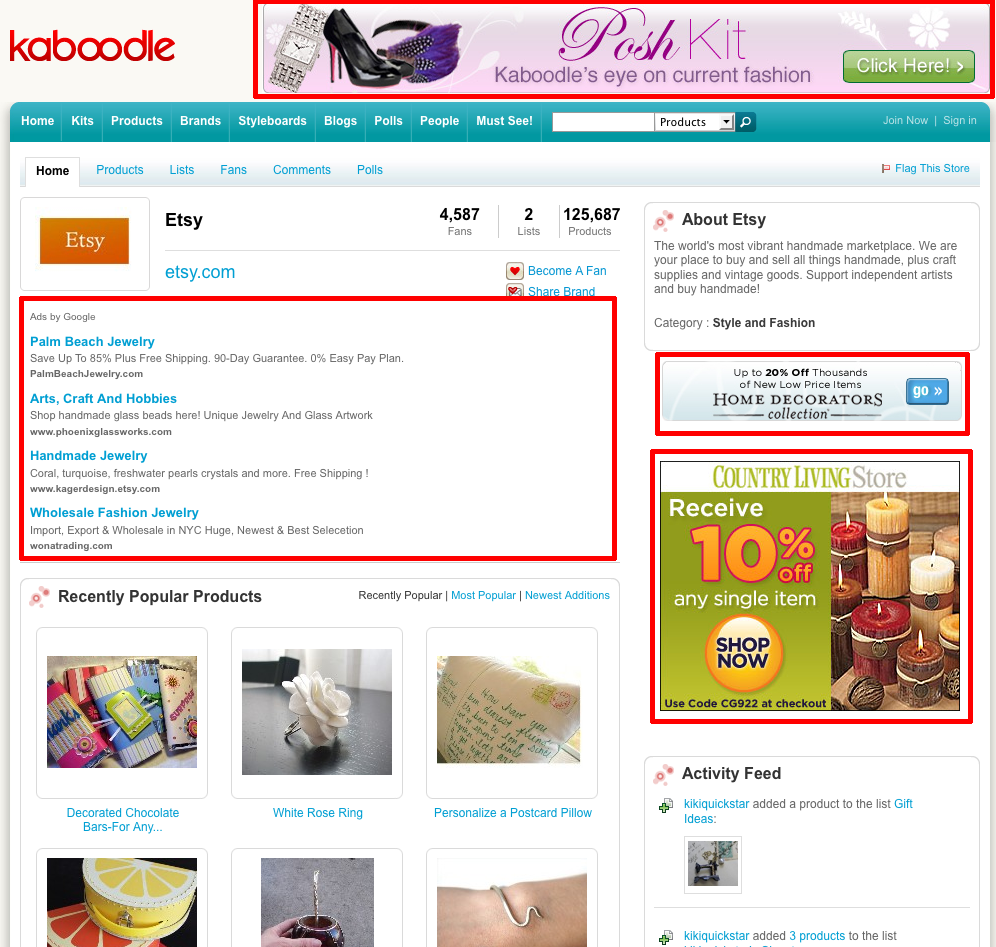
A fair chunk of my screen is used by ads and for their nontechnical, small-monitor-owning target audience, it would make up even more.
There’s a tricky balance between making the content easy to find and placing ads in prominent positions to increase clickthrough rates and profits. You want ads but you don’t want so many that people have no reason to come to your site or can’t find the information once they’re there. If you cover you three quarters of your site with ads, you’d likely lose a significant portion of the new visitors who can’t quickly find what they’re looking for.
And just because you can place more ads doesn’t necessarily mean you should. Its possible that a few well placed ads on Kaboodle would result in more people sharing the site, which would lead to more visitors to the site in the long run and higher profits.
But who knows. Maybe the majority of their nontechnical target audience thinks the ads are the content. Or maybe they know they’re ads, but don’t care because hey, it’s an online shopping site. Maybe Kaboodle has A/B tested their pages dozens of times and have determined that this is the optimal ad to content ratio. Maybe they don’t care about the people who care about ad placement because those people, like me, never click the ads (that’s probably true). And maybe the people that can’t find the content because they can’t scroll past the ads are also the people who believe their identity will be stolen if they use their credit card online, so won’t buy anything anyway.
Admittedly, they seem to be doing alright for themselves:

There’s an important lesson here for picky web developers like me: most people are not picky web developers.
 Matt Mazur