
By default, when you open up a new Terminal window in Mac OS X the command prompt displays a relatively long name:

I prefer to shorten this to a simple dollar sign ($) in order to free up space.
To change your default command line prompt, follow these instructions:
1) Navigate to your home directory:
cd ~
2) Create a file called .bash_profile
vi .bash_profile
3) Add the following line (press i)
export PS1="$ "
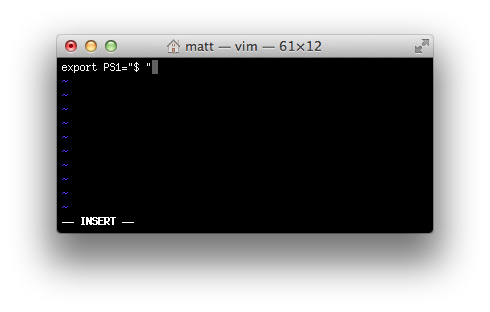
4) Save the file (press Escape, type :wq and hit Enter)
5) Restart Terminal
You should now see something like this:
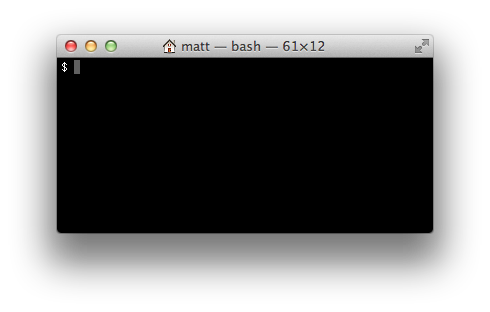
There are other ways you can configure the command prompt (for example, showing the current time), but I prefer to keep it simple.
 Matt Mazur
Thank man!
I prefer export=”W $ ” so I can see the current working directory.
If I traverse from home directory to /Users/###/code/sites I see the following prompts:
$ cd code
code $ cd sites
sites $
i can’t figure out how to and where to save the file.
This is the best tutorial I have found ( by far ) on modifying the terminal prompt.
Thank you! Very straight forward (even indicating how to work vi). Best help I found.
beautiful, your tip and my mac terminal :)
Never knew this option. Thanks!
Thank you!! Your guide is the simplest way I found~ ;-D
Reblogged this on keltheceo and commented:
wow, it’s quick and a breeze to follow.
Thank you so much! This was very helpful. Simple and straightforward.
just Perfect. Thank you man
If I want to change it again, how do I do that? Once I type vi .bash_profile it doesn’t let me change the previous settings I’ve set up.
Hey, when you open it in vi again it should reflect your previous changes. You might need to do:
vi ~/.bash_profile
To ensure it loads it from the home directory.
Now that Bbedit reverts a form of Textwrangler after the trial period expires, I suggest that folks use it rather than vi. It’s much more user friendly.
thank you so much. you are a hero. thank you.
Best tutorial ever! Thank you!
Thanks! The long terminal line was killing me. This tutorial really helped.
Thank you! Couldn’t stand that long terminal line.
Thanks!!!!
awesome tutorial
No need to restart terminal just:
source ~/.profile
and it will update
No error but doesn’t work for me. Don’t know why.
This didn’t work for me but I found a solution. Maybe because I have a newer M1 Mac: https://youtu.be/gYREC_Zj4wk